Typography // Task 3A & 3B: Type Design & Communication
23rd May 2022 - 20th June 2022 (Week 9 - Week 13)
Bachelor of Design (Hons) in Creative Media
Typography // Task 3A& 3B: Type Design & Communication

LECTURES
Task 3A: Type Design
Week 9 / Lecture 9
I started the week by watching videos that Mr. Vinod pre-recorded to get an
idea of how to start Task 3A and how should I do it. In the video, Mr. Vinod
taught us how to do Task 3A. First and foremost, we need to do some visual
research to get inspiration and understand more about how to create
typefaces. Then we would have to sketch our typefaces, preferably five with
different styles.
Finally, we would have to choose the best typefaces we have created and
digitize them using the same ten fonts we have used since the beginning. But
we would have to deconstruct three letters to understand and analyze the
anatomy of the latter, which we would be using to digitize our
typeface.
Week 10 / Lecture 10
As it is week 10, I will be doing the digitization process and final
work. So I watched the pre-recorded video again from Mr. Vinod. And
here is what I digested from it.
Adobe Illustrator
1. Artboard -1000 x 1000 pt
2. X-height - 500 x 500 pt
3. Take measurements of the ascender line, cap line, median line,
baseline, and descender line.
4. Remember to use ruler lines to create ascending, Ascender,
descender, x-height, median, and descending lines when illustrating
typeface.
5. Pathfinder, then unite.
6. Try removing some anchor points, so they are not too close
together.
7. Can use a shape or pen tool to create a typeface.
FontLab
1. File, new, font info.
2. Fill in name & copyright.
3. Metric & Dimensions.
4. Key dimensions (put in measurements).
5. Underline should be below descender.
Task 3B: Communication
Week 11 / Lecture 11
This week, we were tasked with creating a greeting sticker,
such as Happy Birthday, Happy Halloween, Christmas, etc. And
here are things that need to be kept in mind while designing
the sticker.
• Research Lettering
• Read the article provided in Module Info.
• Select greeting
• Sketch 5 options
• 512-pixel size of the final artwork
• First, design your lettering using BW only
• Introduce color (Taylor's) Red, White & Black
• You must not use gradients, only flat tones
• Use the Taylor's Mark in your sticker
• Read the article provided in Module Info.
• Select greeting
• Sketch 5 options
• 512-pixel size of the final artwork
• First, design your lettering using BW only
• Introduce color (Taylor's) Red, White & Black
• You must not use gradients, only flat tones
• Use the Taylor's Mark in your sticker
Week 12 / Lecture 12
Once we are finished with the sticker, we need to do what's
written below.
1. Black & White (1024 px min. 2048 px max.) PNG
2. Colour (1024 px min. 2048 px max.) PNG
3. PDF of 1 & 2
2. Colour (1024 px min. 2048 px max.) PNG
3. PDF of 1 & 2
Week 13 / Lecture 13
As I had made the sticker, this week, I will be making the sticker
usable to use on any social media.
INSTRUCTIONS
<iframe
src="https://drive.google.com/file/d/1UzILynexkZbXlxz6ihyb7jFHE6Td-bTp/preview"
width="640" height="480" allow="autoplay"></iframe>
TASKS
Task 3A: Type Design
Week 9 / Type Design Part 1
We are designing a few letters for this task: a e t k g r I y m p n ! #,.
To start the lesson, I did some visual research first.
Visual Research

fig. 9.9.0 Visual Research 1
27th May 2022
https://www.pinterest.com/pin/369154500697124570/

fig. 9.9.1 Visual Research 2
27th May 2022
https://www.pinterest.com/pin/377739487485247095/
As you can see from my visual research, I am trying to go for thicker
fonts. This is because I find wider fonts more attractive as they appeal
to the reader and make it easier for them to read.
Sketches
Before I started any sketch, I got myself a visual reference. It is to
show what I want my typefaces to be inspired. We know I will make a
thick typeface, but how is the question. I thought that maybe I could
use Tetris as my visual reference. Tetris comes with a few shapes that
can be made into a letter, and it is pretty blocky, which fits the thick
type I want. Another reason I chose Tetris as my visual reference is
because I grew up playing various games, and Tetris is one of my classic
favorites of all time.

fig. 9.9.2 Visual Reference 1
27th May 2022
https://www.pinterest.com/pin/860328335079102912/

27th May 2022
https://www.pinterest.com/pin/233905774385712587/

fig. 9.9.4 Visual Reference 3
27th May 2022
https://www.vecteezy.com/vector-art/4855377-curled-corners-set-paper-page-curl-corner-flip-turn-fold-sheet-sticker-curly-angle-bent-border-notepad-doodle-square-edge-vector-design
I added one more visual reference that is not Tetris because my
sketches had another inspiration: paper folding. Paper folding was
another memorable thing I did during my childhood, origami. And
also, I wanted to create typefaces that look folded.
.jpg)
27th May 2022
Sketch 1 & 2
The first variant of my sketch is 1 and 2. As you can see, it is very
much as blocky as thick in size. You can see that both represented
Tetris in a way as Tetris is a game of different shapes of blocks
merging.
Sketch 3 & 4
I tried to keep it thick for my other sketches such as this. As for
sketches 3 and 4, it does not represent Tetris but paper folding. I
tried folding each of the alphabets above while still being able to
identify the letters; I did not want to fold too much to the point you
can not read the notes, is what I mean.
Sketch 5
I tried a different way to represent my letters in Tetris form, so in
this sketch, instead of making it look so blocky. I tried to use the
Tetris blocks that have been in the game already and merge each of the
blocks, creating an alphabet.
Before going to the next step, I needed to know which style of fonts
should I use to create my typeface. So I decided to ask two of my
friends which one of the typefaces I have designed they like the most.
Of course, this would not help me choose which typeface I should
finalize, but it would also help me decide which typefaces would
benefit people in general. And here is the result.
.jpg)
fig. 9.9.6 Friend 1
27th May 2022
.jpg)
fig. 9.9.7 Friend 2
27th May 2022
Their choices seem like the folding paper design is
the best compared to the rest. This made me decide to digitize
sketches 3 and 4 in the upcoming steps. And I no longer need to look
at other drawings and just focus on creating sketches 3 and 4.
Week 10 / Type Design Final Part
Digitization
Moving on to the next step, this week, I will be digitalizing the chosen
sketch I did in the previous week.

fig. 10.10.0 Digitisation process
30th May 2022
.png)
fig. 10.10.1 Digitisation process 2
30th May 2022
I will be using the shape tools to create my font as it is quite a boxy
font, so it will be easier for me with the shape tools. So, with this, I
start digitizing my fonts by beginning with the letters "A" and "N."
.png)
fig. 10.10.2 Digitisation process 3
30th May 2022
I tried placing the shapes together first to make the letters "A" and "N," which is why it still has not looked like the folded font sketch I did in the previous steps. So now, I will be trying to manipulate the shapes to give the folded look to it.
.png)
fig. 10.10.3 Digitisation process 4
30th May 2022
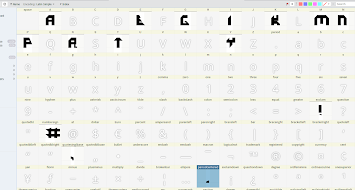
I did it, and as far as I can tell, it looks good. So, without further
ado, I complete the rest of the letters. Here is it:
.png)
fig. 10.10.4 Final digitization process 5
30th May 2022
.png)
.png)
.png)
.png)
.png)
.png)
.png)
.png)
.png)
.png)
.png)
.png)
.png)
.png)
.png)
.png)
.png)
.png)


Throughout the process, I thought I could do better than my sketch
for two letters, "T" and "P," so I decided to tweak the design a
little bit in Illustrator. Here is the comparison:
.png)
fig. 10.10.5 First Prototype "T"
30th May 2022
.png)
fig. 10.10.6 Final "T"
30th May 2022
.png)
fig. 10.10.7 First Prototype "P"
30th May 2022
.png)
fig. 10.10.8 Final "P"
30th May 2022
Fontlab
Before transferring my typefaces to Fontlab, I first needed
to take measurements of the ascender line, cap line, median
line, baseline, and descender line in Illustrator.
Including merging each of the typefaces, so it became a
whole.
.png)
fig. 10.10.9 The measurements
30th May 2022
.png)
fig. 10.10.10 Merged
30th May 2022
And finally, it is time to move to FontLab. With the
help of Mr. Vinod's video, here is what I have
accomplished in Fontlab.
.png)
fig. 10.10.11 Preferences
30th May 2022
.png)
fig. 10.10.12 Letters have been added to Fontlab
30th May 2022
.png)
fig. 10.10.13 Test 1
30th May 2022
It looks terrible as the letters are too close to each
other; therefore, I adjusted with letter spacing and
kerning.
.png)
fig. 10.10.14 Letter Spacing and Kerning
30th May 2022
It looks a whole lot better with the
letter-spacing and kerning added. Here is the
outcome of putting those:
.png)
fig. 10.10.15 Test 2
30th May 2022
Here is a few more information regarding the
fonts name, ascenders, descenders, etc.
.png)
fig. 10.10.16 Font name
30th May 2022
.png)
fig. 10.10.17 Ascender, descender, and
line gap measurements
30th May 2022
.png)
fig. 10.10.18 Caps, x, and underline
measurements
30th May 2022
.png)
fig. 10.10.19 Final Test
30th May 2022
Poster Ideas
.png)
fig. 10.10.20 Idea 1
30th May 2022
.png)
fig. 10.10.21 Idea 2
30th May 2022
.png)
fig. 10.10.22 Idea 3
30th May 2022
Final Results
Font Download
https://drive.google.com/file/d/121y-UeyUx3P5d5iS8iQNUXi6X21X9zx-/view?usp=sharing
Final Font

fig. 10.10.23 Final
Font
30th May 2022
Font Name: Folded
Regular
Ascender line:
719 pt
Cap line:
684 pt
Median line:
498 pt
Descender
line: -211
pt
Final Poster

fig. 10.10.24 Final Poster
30th May 2022
PDF
<iframe src="https://drive.google.com/file/d/1IAhwjfzwQcLgnjkx-YVj_B-4QQZrqGng/preview" width="640" height="480" allow="autoplay"></iframe>
<iframe
<iframe src="https://drive.google.com/file/d/1IAhwjfzwQcLgnjkx-YVj_B-4QQZrqGng/preview" width="640" height="480" allow="autoplay"></iframe>
Task 3B: Communication
Week 11 / Communication Part 1
This is pretty easy for me; I immediately know what greeting I would
make a sticker out of. I chose " Eid Mubarak" as it is a standard
greeting commonly said during Hari Raya. And Hari Raya is the festival
of breaking the fast, a religious holiday celebrated by Muslims in Malaysia. I chose this
greeting mainly because I am a Muslim, and it is a celebration I
celebrate every year. So it would be fun to create my own greeting
sticker that I may use in the future.
Visual Research
These are the few designs I found while researching that could be an
inspiration for me.

fig. 11.11.0 Design 1
5th June 2022
https://www.pinterest.com/pin/45810121227113872/

fig. 11.11.1 Design 2
5th June 2022
https://pngtree.com/freepng/black-runes-of-eid-al-fitr_3396809.html

fig. 11.11.2 Design 3
5th June 2022
https://www.pinterest.com/pin/65302263338537339/\
Sketches
After an hour of research, I moved on to sketching.
.jpg)
fig. 11.11.3 Sketches
5th June 2022
Sketch 1: I had a few ideas while sketching; one of them was, what if
I draw a chibi character wearing baju melayu (traditional clothing you
wear during Raya) saying, Eid Mubarak while surrounding the chibi
character with Raya most memorable things we do, such as fireworks,
eating ketupat (a traditional food of ours), which I executed here.
Sketch 2: I wanted to keep it simple; I simply wrote down Eid
Mubarak and surrounded it with Raya stuff.
Sketch 3: During Raya, we usually would get money in a cover from our
parents, uncles, aunties, and neighbors. This is why I drew exactly
that surrounding it with fireworks.
Sketch 4: Ketupat is a must food to eat during Raya; if you don't like
it, then I have no words for you. You are not a Muslim, kidding.
Please don't take that seriously; I just wanted to use ketupat as the
primary objective to look at here because, in my other sketches,
ketupat is just drawn in the background.
Sketch 5: At this point, I had fewer to no more ideas, honestly. It is
the main reason I only drew the prayer beads most Muslims use after
prayer as the central part of the drawing, then proceeded to only
write down Eid Mubarak in the middle of it.
Week 12 / Communication Part 2
It is digitalization week for us. We have to digitalize our sketches in
black and white and color too. As for which design I would digitalize, I
have decided to use the first design as it shows the meaning of "Eid
Mubarak" the most out of all the plans.
Digitalization
While in the process of digitalizing it, I totally forgot I had to
incorporate Taylor's logo into the design. Luckily, it was not much trouble, so I adjusted my plan slightly and put the stamp into it.
.JPG)
fig. 12.12.0 Modified Sketch
13th June 2022
Final Outcome:
After this, I would proceed to finalize the design by
coloring it. And here are the outcome I got out of it.

fig. 12.12.1 Black & White Design
13th June 2022

fig. 12.12.2 Colourise Design
13th June 2022
PDF
<iframe src="https://drive.google.com/file/d/1u1oOHEyZo3JtVqbvU_b3OLmh8RgdmBk6/preview" width="640" height="480" allow="autoplay"></iframe>
Week 13 / Communication Final Part
As for the final week, I tried the sticker in Telegram to see if it worked or not.
Telegram
.png)
fig. 13.13.0 Sticker 1
20th June 2022
.png)
fig. 13.13.1 Sticker 2
20th June 2022
Sticker Pack Link: https://t.me/addstickers/Emranss
FEEDBACKS
Task 3A: Type Design
Week 9
I like the third sketch the most between the drawings, as it gives
out an "I am different" vibe. Although I was not initially sure
whether I should go for the third sketch, I tried asking multiple
people for their opinions on which they liked the most. To my
surprise, the third sketch was voted the most, giving more than a
reason to digitalize that one.
Week 10
The final results were great for me. I felt like I did my best in
designing the fonts and poster.
Task 3B: Communication
Week 11
The sketches look good; however, there is some problem. Sketch 2, 3, and 5 show that I did not use any lettering. Sketch 4 is good, but the letter must be the first thing you see when looking at it. The sketch is good too; in my opinion, I did the lettering, and you would pay attention to it first at first glance.
Week 12
The black and white version looks decent while, on the other hand, not so much for the colorized version.
Week 13
There was no problem with the stickers as they worked in Telegram.
REFLECTIONS
Task 3A: Type Design
Experience of the task
It was exciting for sure because who could have thought that I would
create my own fonts this early at the beginning of the stage. I am
still relatively new to design; this is the first sem of my first-year
degree. So definitely, I didn't expect to create a font at this stage.
But I am glad I could experience it at an early stage of my adventure.
Although it was pretty hard at the same time, getting ideas to create
my own font because, as you know, there are thousands of fonts out
there, and to create an original font of your own is quite hard, I
must say. But in the end, I managed to get through the hurdle and make
my original font, but I still wish to improve it.
Observations of the task
Like I said, it is not easy to create your own fonts, as there are
thousands of fonts and more out there in the world, but I did it
anyway. The process of making it was long but worth it. I had no idea
what type of fonts should I begin with. That is why I did my own
research at first, watched a couple of videos, and finally found an
idea. I decided to base my fonts on my childhood favorite things to
do.
Findings of the task
Each step is vital in creating fonts. Deconstructing the letter part
opened my mind, or you could broaden my knowledge. Because I never knew
that those letters were made delicately, I never knew they had different
parts combined into one. In fact, I never cared or paid attention to it.
This is definitely something that caught my attention recently, and it
was intriguing to me. As I went on to create my fonts, I underestimated
how hard it was to create my own fonts. When I thought I had done it, I
found mistakes that greatly frustrated me. This is why I now have a lot
of respect for the designer, as I know I won't do this again.
Task 3B: Communication
Experience of the task
The thought of making the greeting sticker seems fun, but doing so, not so much. I did enjoy making various designs of it. But when I got to coloring it, I messed up big time, as I am not good with it. I feel like because of the coloring will impact my results significantly. I wished to do better.
Observations of the task
I tried my best to make the sticker as enjoyable as possible. I didn't want to be boring and just put words, so I created a chibi expressing the words. But it was not well done because I believe my mistakes were the coloring parts. It lacks impact, no shadows, basic shading, flat colors, etc. And probably the words it was not expressed thoroughly.
Findings of the task
Greeting stickers need to have an impact, and it needs to create attentively. Because everything matters, the size of the strokes, the colors, the blending of the colors, shadows, the shape, etc. It will affect the sticker significantly. Although, it is also good to keep it simple and minimalistic.
FURTHER READING
Task 3A: Type Design
.png)
https://youtu.be/BSe_BeNk5cA
26th May 2022
Task 3B: Communication
.png)
https://youtu.be/UcL_yfQh86E
5th June 2022

Comments
Post a Comment